Membership |
Payments |
|

|
 |
For information contact us – click >>> by email,
or our mobile # 0478 219 220 by text (SMS), or voice call (during business hours Mon-Fri). Phone calls will probably go to voice mail – please leave your name & phone number & the subject you want to talk about – we will get back to you ASAP.
We look forward to seeing you(date to be confirmed)
for BeConnected classes.
BeConnected classes are free.
WATCH THIS SPACE FOR THE DATE OF RESUMPTION OF CLASSES
You are invited to listen…
We are “Unbroken Records”, a podcast series about the stories that arise from the everyday objects of our lives.
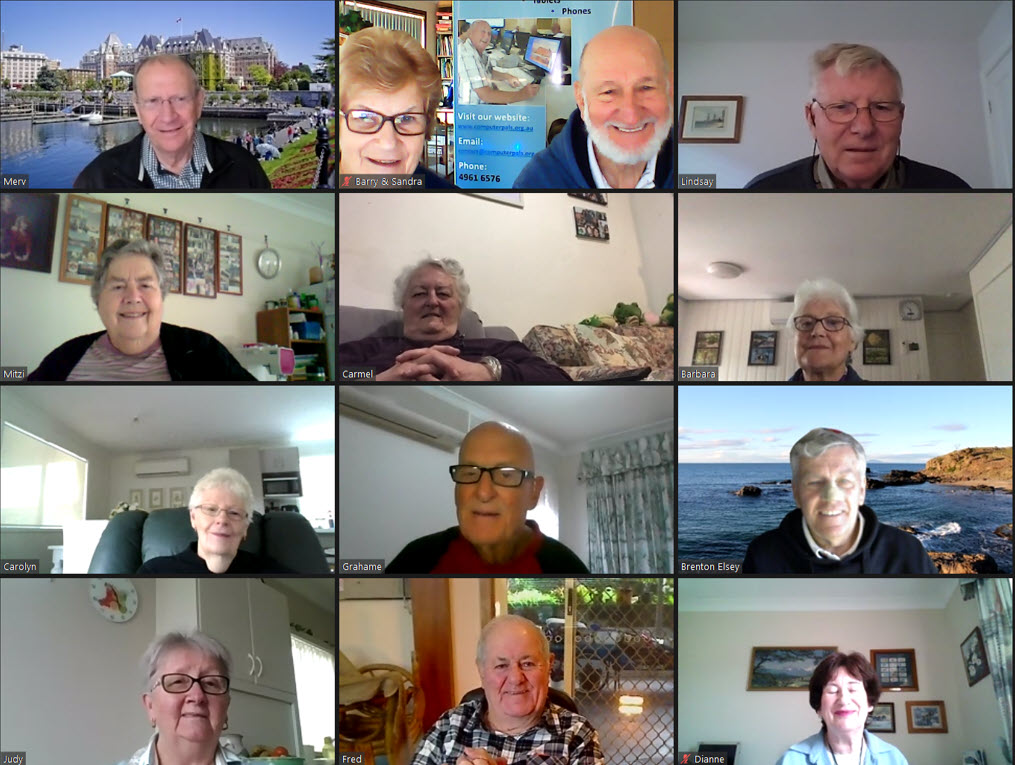
In June 2022, twelve people, each with their own unique story, were drawn together from around the city of Newcastle (including 6 from Computerpals) in collaboration with Newcastle Libraries and Newcastle University in a pilot program.
The participants ranged in age from 73 to 92 years young. What happened in these workshops was a combination of luck and magic. It was an exercise in human connection which had been lacking for two years due to a global pandemic.
Over the course of four workshops, they were invited to engage creatively with their own stories, through journaling exercises, collaborative photographic practice, memory objects and the recording of this podcast.
In recording these voices and sharing these stories with you here, we continue an unbroken record of the many lives that make this city what it is.
The vast majority of people are now double vaccinated and some have had their booster. This reduces the chance of being seriously affected by COVID-19. You can still catch COVID-19 (one of the variants) – here are ways you can minimise your chance of contracting it:
- Observe good hand hygiene
- Practice social distancing
- Keep interactions with parties outside your family and friends brief
- Wear a mask in the high-risk situations identified by the government
CLASS BOOKINGS…..
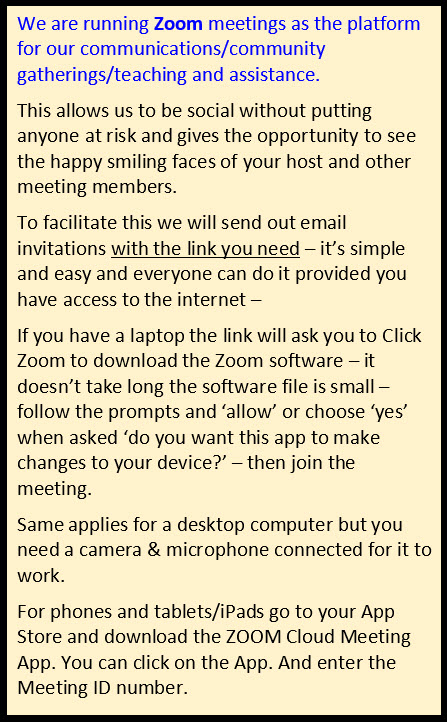
Joining a Zoom session for the First Time
Click Here for a rundown on the ‘How to’ by BeConnected.
Click Here for a print copy of the instructions.
We are now a registered Charity  What does that mean?
The club is eligible for GST Concession and Income Tax Exemption.
Unfortunately, we have not received Designated Gift Recipient Status –
in other words, sadly – donations to the club are NOT tax-deductible.
Want to catch up with us on Facebook? CLICK HERE
Who Provides Our Training?
Tutoring & Mentoring is provided by a band of volunteers, prepared to share their knowledge and give their time, so that we can provide training at minimum cost. Being a member of ASCCA ( Australian Seniors Computer Clubs Association ), we have access to ASCCA’s resources and links to other Seniors’ Computing Clubs throughout Australia. If you would like to become involved as a tutor, or if you know someone who has the skills but is not yet a member, please contact our Tutor Coordinator.
Our mission is to educate seniors on the use of computers and other technology (phones & tablets) as a way of enriching their lives and making them more self-reliant. We bridge the generation gap and assist seniors to find ways to benefit themselves and the community through their collective experience and knowledge.
Are You OK?
We are aware of the challenges of keeping our own energy levels up as COVID goes from a sprint to a marathon, and we’re sure many of you feel likewise. While the media headlines are focused on case numbers and community transmissions, we shouldn’t forget the hidden toll this pandemic is having on the collective mental health in our communities. It is more important than ever to look out for ourselves and each other, and as a club, we will continue to explore ways to make sure we’re playing our part and providing the support that’s needed.
At the AGM on Friday 5 August, 2022 the following people were elected to the Committee for 2022-23:
President – Barry Keen
Vice President – Jackie Lampe
Secretary – Wendy Smith
Treasurer – Grahame King
Committee members – Brenton Elsey, Mitzi Gordon, Denise Hayes, Ray Hinton, Sandra Keen, Fred Neal, Margie Olsen, Merv Pope, Carmel Smith, Lindsay Threadgate (Public Officer), Judy Wallace
Newsletter |
||

|
|

Social Secretary
Be Connected – What is it?
Be Connected is an Australia-wide Federal Government initiative empowering all Australians to thrive in a digital world. There are online learning resources as well as a network of community partners – the Be Connected Network – who offer in-person support so you can develop your digital skills and confidence.
ComputerPals for Seniors – Newcastle Inc. is a Be Connected Network Partner and we are here to help you.

Be Connected classes are FREE
If you have a need to develop skills to use a computer/tablet or smartphone – these classes are for you. The training is offered in small groups to allow personalised learning and one-on-one coaching where possible. Phone 0478 219 220 (This will probably go to a voice mail – please leave your name & phone number – we will get back to you ASAP), alternatively send a text message (SMS) to enrol in the program through us and get our support.
CLICK HERE for the Be Connected website for more information. Then scroll down for an introductory video.
The Be Connected website has a fresh new look!
- A new navigation bar that takes you directly to our Articles & tips, Podcast, and Games and practice area (More ways to learn)
- Easy-to-find selection of our latest and most popular resources (New, Popular, Articles & tips and Podcast)
- Filter courses by topic area in the new More to explore section.
- Help now includes a glossary of tech terms to help you break down the jargon and frequently asked questions, like how to reset your password or update your email address.


Protect yourself after a data breach
Read our new article, Data breaches: what to do and how to protect yourself against scams, to discover trusted and reliable sources of information that offer advice on the steps you can take to mitigate the risk of scams and identity theft.
Protect yourself against scams
Being aware of scammers is one of the important steps towards avoiding them. Once you know their tricks, you’re more likely to be able to spot a scam.
In this popular presentation learn how to protect your personal information from scammers, how to safely make friends online and where to go if you need help.
-
- 21 March 3 – 4pm [AEST]
- 20 June 10 – 11am [AEST]
- 1 August 10 – 11am [AEST]
- 5 October 10 – 11am [AEDT]

Helpful apps for your smart device
Apps, or applications, are not just for fun – many can help us in our daily lives.
Join this presentation to find out about apps that you may find useful, learn where to find them and how to manage them, so you can use them with confidence.
-
- 7 March 10 – 11am [AEDT]
- 20 April 10 – 11am [AEST]
- 22 June 3 – 4pm [AEST


Looking for something to listen to over the holidays?
Did you know Be Connected has a podcast series? Join us as we explore common technology questions and dive into conversations to build your digital confidence.
With 12 episodes you can listen to today, there’s so much to discover over the holidays, including what online scammers don’t want you to know, internet trivia questions and more.
 How to use government websites
Join our 1-hour presentation to learn
- Which government websites might benefit you
- How to set up a MyGov account
- How to link other government services to your MyGov account
- How to keep your personal details safe and secure
Dates:
-
- 9 March 3 – 4pm [AEDT]
- 11 July 10 – 11am [AEST]
- 19 September 10 – 11am [AEST]